
Notion Game Database Integration
A downloadable asset pack for Windows, macOS, Linux, and Android
🔄 Notion Game Database Integration
DESIGN IN NOTION. BUILD WITH LOCAL UNITY DATA.
Notion Game Database Integration brings structured game content from Notion into Unity as local ScriptableObjects.
Maintain item tables, quests, NPC data, localization, dialogue, and changelogs in a shared Notion workspace. Preview and validate incoming changes inside Unity, then generate local assets your game can use without requiring Notion at runtime.
The workflow keeps content authoring accessible to designers while giving developers inspectable, version-control-friendly Unity assets.
🗃️ Six Connected Data Collections
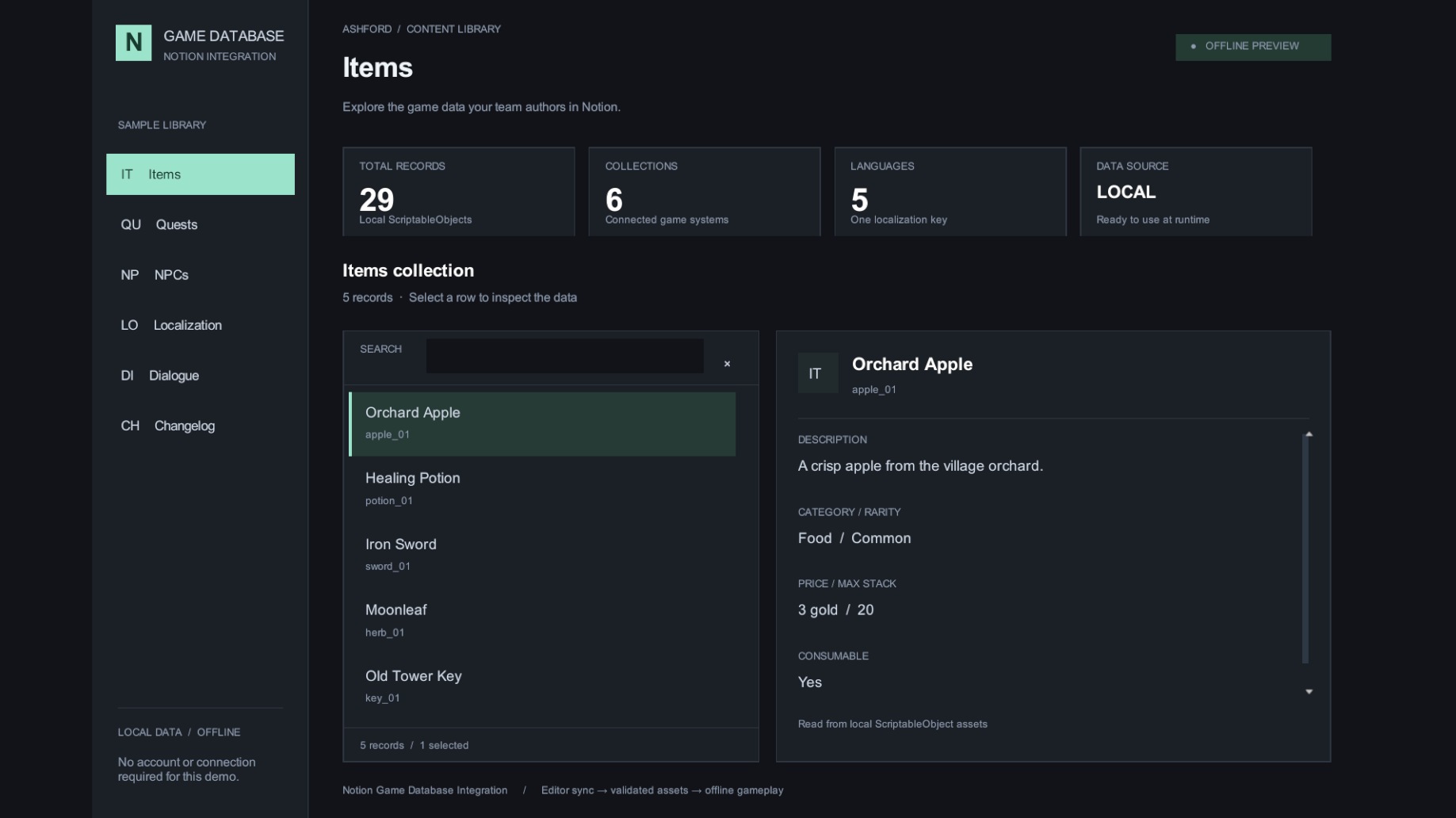
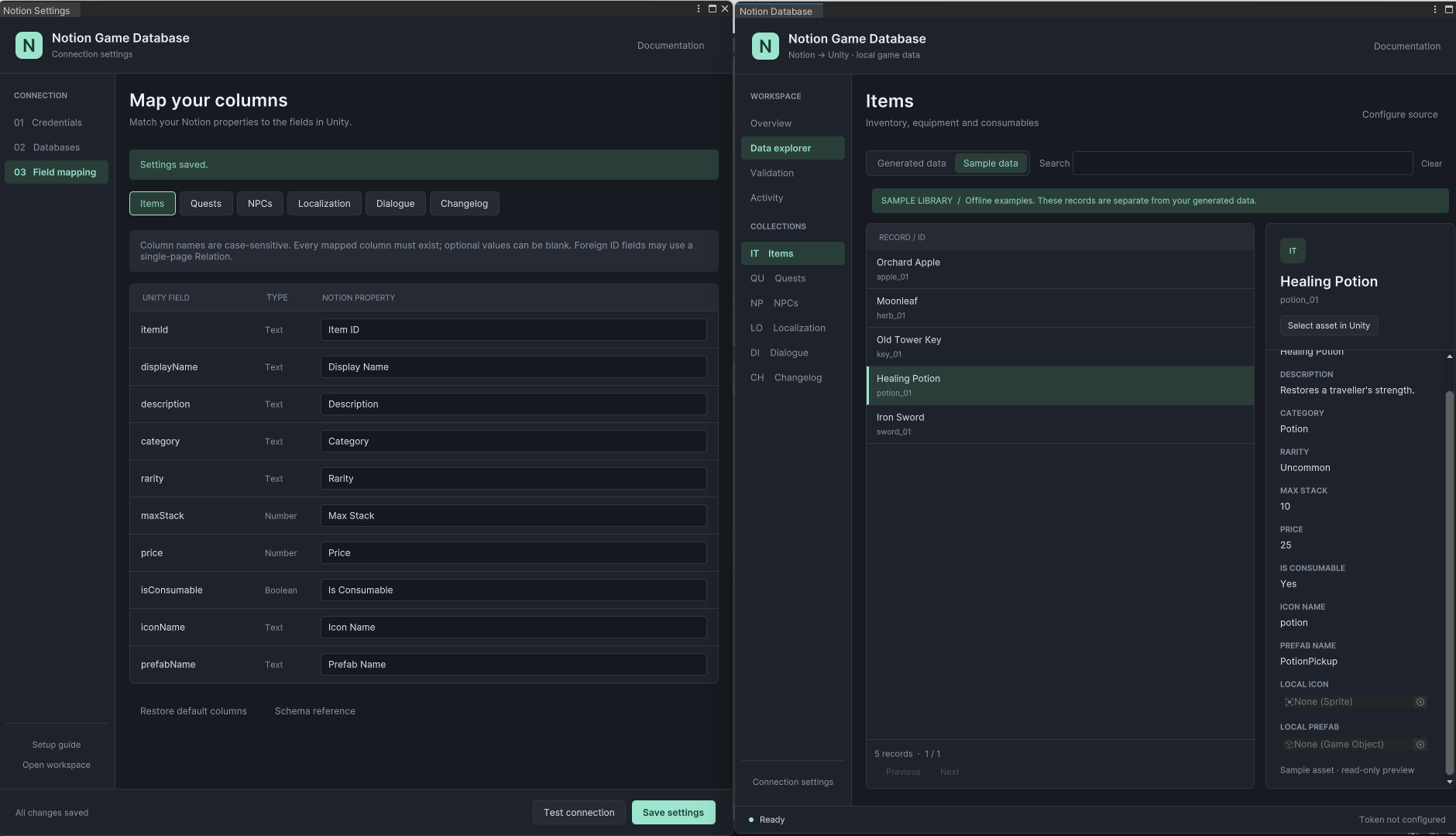
📦 Items
Manage item IDs, names, descriptions, categories, rarity, prices, stack limits, and consumable flags. Assign local Sprite icons and GameObject prefabs directly in Unity.
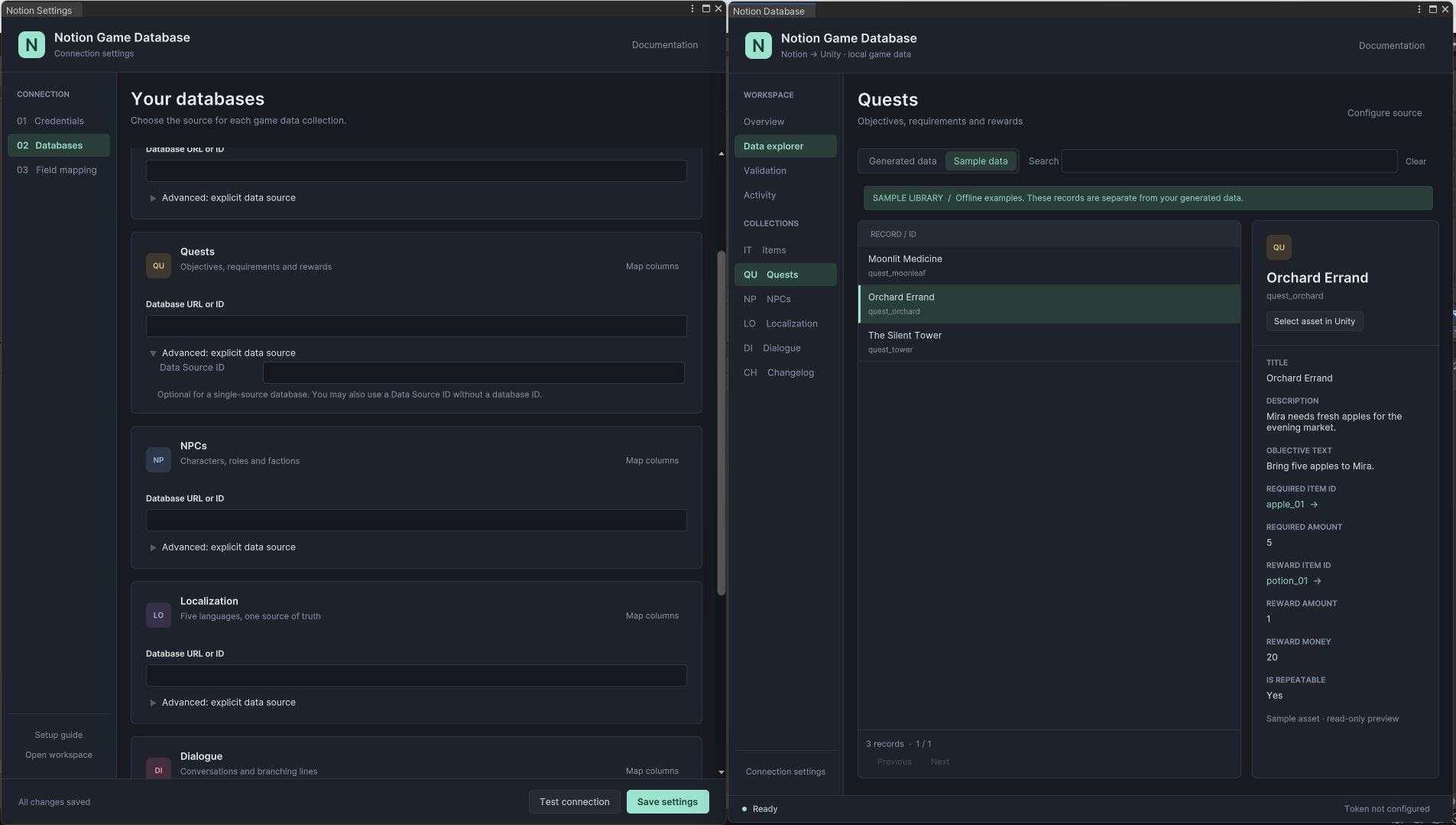
📋 Quests
Define titles, descriptions, objectives, required items, quantities, rewards, and repeatable states. Item references can be validated before changes are applied.
👤 NPCs
Store character names, roles, factions, service flags, and default dialogue references while keeping portrait assignments local to the Unity project.
🌐 Localization
Manage shared localization keys with included fields for English, Ukrainian, Polish, German, and Spanish. Runtime fallback behavior is included and the source can be extended with additional languages.
💬 Dialogue
Import dialogue records containing speaker references, localization keys, continuation IDs, linked quests, and conversation-ending flags.
📝 Changelog
Store game versions, dates, titles, descriptions, and change types as local assets for release notes or in-game update displays.
🖥️ Dedicated Unity Editor Workspace
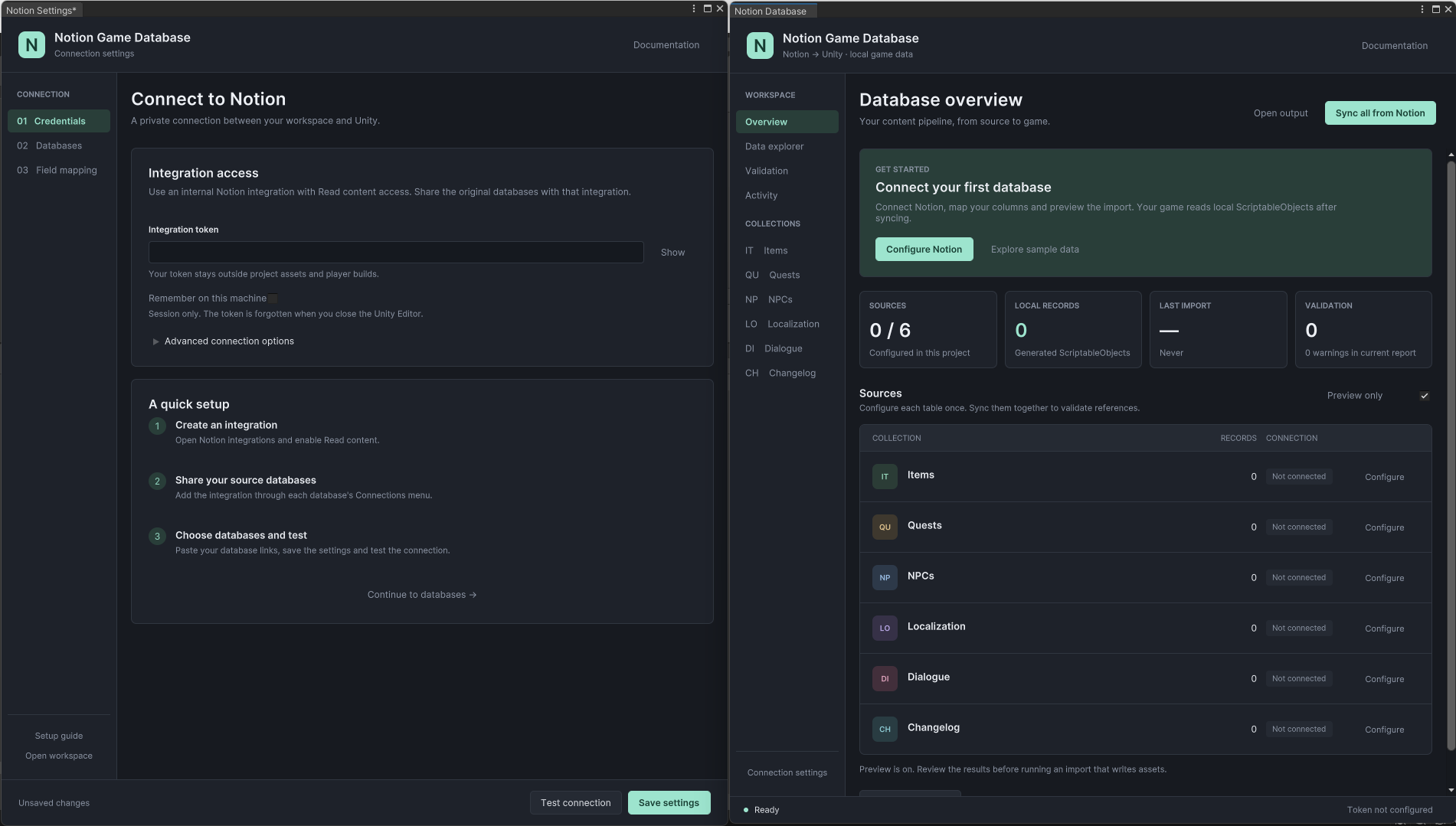
Manage synchronization through a UI Toolkit workspace with separate Overview, Data Explorer, Validation, and Activity sections.
- View configured data sources
- See generated record totals
- Check the last successful import
- Review validation totals
- Sync individual collections
- Import all configured collections together
Open it from:
Tools > Notion Game Database > Sync Window
🔎 Data Explorer
Browse both imported project data and the included sample library directly inside Unity.
- Switch between generated and sample content
- Search IDs, names, and mapped values
- Browse records with pagination
- Inspect records in a contextual detail panel
- Follow references between related records
- Identify missing references
- Select the underlying Unity asset
- Assign item icons and prefabs
- Assign NPC portraits
Mapped Notion data remains controlled by Notion while local Unity object references are preserved during later imports.
🧪 Preview Before Importing
Preview mode downloads and validates incoming content without writing generated assets.
Inspect proposed changes before applying them to the project.
Validation can detect:
- Duplicate IDs
- Missing references
- Invalid values
- Missing columns
- Identity collisions
Diagnostics can be filtered by severity, searched, and exported as a JSON report. Blocking validation errors prevent the batch from being applied.
For an initial import, linked collections can be synchronized together so references resolve as one batch.
♻️ Repeatable Asset Updates
Existing records update in place rather than creating new assets on every synchronization.
- Existing Unity GUIDs are preserved
- Local object references are preserved
- Tracked Notion page identities are maintained
- Supported record ID changes can retain the existing Unity asset
- Recovery backups are included
- Rollback handling covers ordinary import exceptions
Rows missing from later Notion responses remain locally available, allowing deletion to remain a deliberate project decision.
⚙️ Configurable Connections & Field Mapping
Settings are organized into Credentials, Databases, and Field Mapping sections.
- Enter Notion database links or IDs
- Select explicit data sources when required
- Map Notion property names to supplied Unity fields
- Leave unused collections unconfigured
- Test connection access and configured schemas
Requests support cursor pagination, configurable timeouts, cancellation, and bounded retries for temporary service errors and rate limits.
Synchronization is read-only toward Notion. The integration does not write changes back to your Notion workspace.
🎮 Local Runtime Data
Generated records are collected inside a central GameDatabaseAsset.
The included GameDatabase API provides indexed access to records and localization lookup with fallback behavior.
After importing, the game reads local ScriptableObjects. Players therefore do not need:
- A Notion account
- A Notion integration token
- An internet connection
Editor networking and credentials are separated from the runtime assembly.
🎁 Demo Works Without a Notion Account
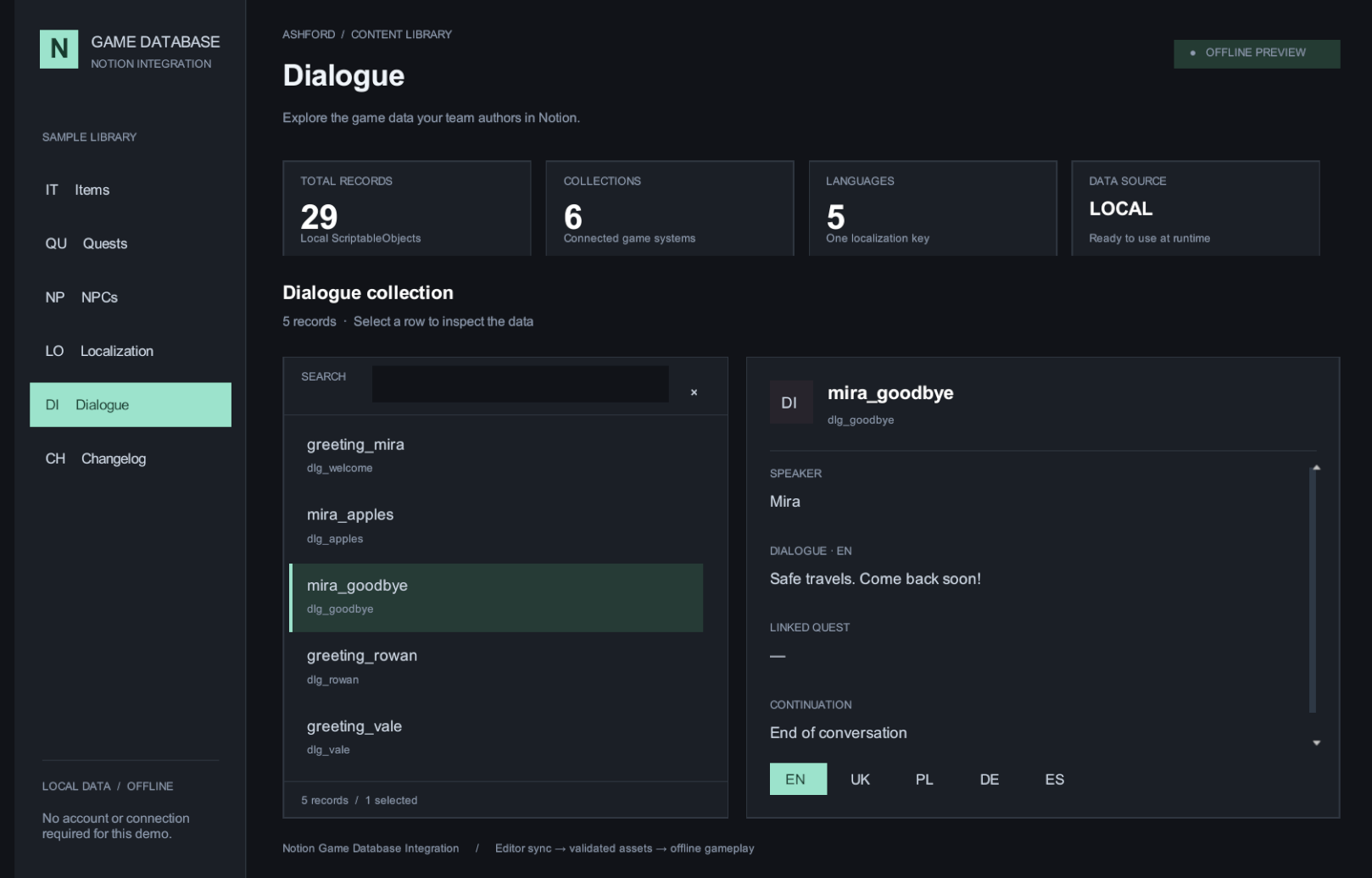
A ready-to-use sample scene is included with 29 local ScriptableObject records:
- 5 Items
- 3 Quests
- 3 NPCs
- 10 Localization entries
- 5 Dialogue records
- 3 Changelog entries
The demo includes collection navigation, searching, selected-record details, language switching, and dialogue navigation.
No credentials are required to explore the included sample content.
📦 What You Receive
- Full C# source code
- Six ScriptableObject record models
- Central GameDatabaseAsset catalog
- Indexed runtime data API
- Runtime reader example
- UI Toolkit editor workspace
- Connection settings interface
- Column mapping interface
- Notion API client
- Import pipeline
- Validation system
- Activity logging
- JSON report export
- Sample ScriptableObjects
- Demo scene
- Six CSV templates for creating Notion tables
- Offline regression tests
- English setup and synchronization documentation
- Runtime documentation
- Troubleshooting documentation
🧩 Built to Be Extended
Use the supplied models as a starting point for RPGs, adventure games, management projects, or other games containing structured data.
Customize field mappings around your existing authoring workflow, or extend the supplied C# models, schemas, and runtime reader when additional fields are required.
No external JSON library, Notion SDK, UGUI, or TextMeshPro package is required. The included runtime demo uses IMGUI and does not depend on a particular render pipeline.
🔐 Credentials & Security
Editor synchronization requires your own Notion account, integration token, access to the source databases, and an internet connection.
- Tokens use session-only storage by default
- Optional remembered storage uses local unencrypted EditorPrefs
- Credentials are not included in generated assets
- Credentials are not included in player builds
📐 Supported Notion Data
Supported mapped properties include:
- Title
- Rich Text
- Number
- Select
- Multi Select
- Checkbox
- Date
- URL
- Single-page Relations for foreign IDs
- Read-only scalar formula results
⚠️ Scope & Limitations
- Synchronization is one-way from Notion to Unity
- Missing or archived Notion rows remain locally available
- No runtime cloud synchronization
- No OAuth interface
- No automatic deletion of missing records
- No automatic image, icon, or prefab downloads
- Page body content is not imported
- People properties are not imported
- Rollup properties are not imported
- Supported foreign relations reference a single page
The package provides data integration and runtime data access. Inventory interaction, quest progression, dialogue presentation, and other game-specific behavior remain part of your project's gameplay systems.
✅ Verification
- 122 offline checks passed on Unity 2022.3.62f3
- 122 offline checks passed on Unity 6000.3.22f1
- Windows x64 demo build passed
- Six-category runtime smoke test passed
Unity 2021.3 and live authenticated Notion synchronization remain unverified. See the included Verification Report for test coverage and remaining compatibility checks.
🖥️ Requirements
- Target: Unity 2021.3 LTS or newer
- Tested: Unity 2022.3.62f3
- Tested: Unity 6000.3.22f1
- Test platform: Windows
- Editor UI: UI Toolkit
- Demo UI: IMGUI
- Source: Full C# source included
🚀 Getting Started
- Import the package into Unity.
- Open the included demo and explore the sample content.
- Create a Notion integration and share the source databases with it.
- Enter credentials, database IDs, and column mappings.
- Run Preview and resolve validation errors.
- Apply the import.
- Assign the generated catalog to your runtime reader.
Tools > Notion Game Database > Sync Window
Notion Game Database Integration is an independent product and is not affiliated with or endorsed by Notion.


Purchase
In order to download this asset pack you must purchase it at or above the minimum price of $9.79 USD. You will get access to the following files:
Leave a comment
Log in with itch.io to leave a comment.